Start in Practice
Ragdoll Soccer is a free Roblox soccer game by Ragdoll Athletics. Every player is a jointed ragdoll, so a mistimed kick or slide can send bodies tumbling. The official description calls the game a soccer physics engine and says it is still in early development.
Open the experience, then go to the practice station and choose Start Lesson. Work through the lessons in this order:
- Moving and sprinting.
- Shooting basics. Shots travel where you look. Look down to keep the ball low, and look up to add height.
- Power shots. Sprint toward the ball and take a fully charged kick.
- Curve shots. Use Q or E, and practice one direction at a time.
- Lobs. Press 2, then tap the left mouse button softly.
Practice also includes free play, basic shooting drills, and goalkeeper practice. Repeat a lesson when the same miss keeps happening. Change only your aim or only your charge between attempts so you can tell which one caused the miss.
Keys for the first match
| Action | PC input |
|---|---|
| Move | WASD or arrow keys |
| Sprint | Shift |
| Kick or charge | Left mouse button |
| Standard kick / lob | 1 / 2 |
| Curve | Q or E while charging |
| Slide tackle | X |
| Call for the ball | G |
The full bind list, including keys that do two jobs, is in the controls guide. There is no stamina bar, so Shift does not run out.
Queue 4v4 quickplay
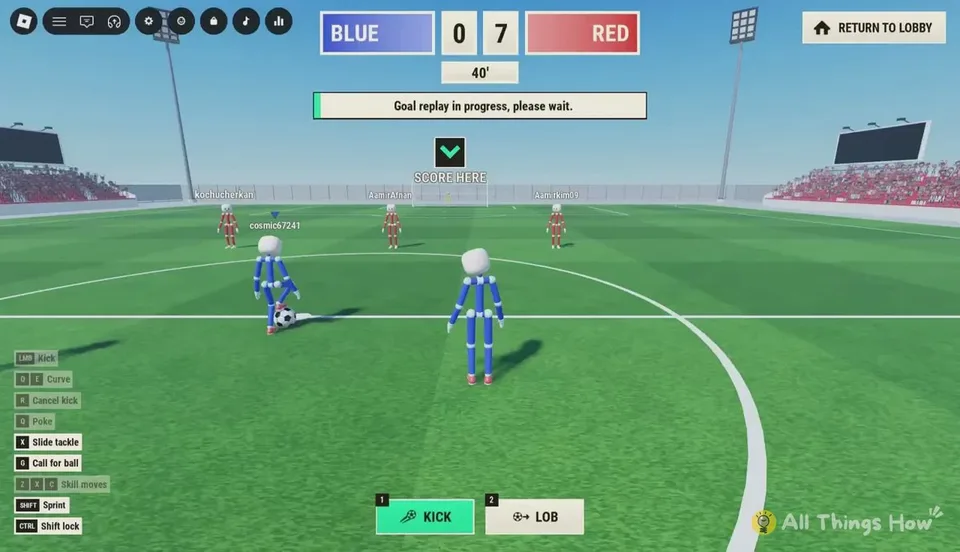
After you can keep a shot low on purpose, open Play and join 4v4 quickplay. At kickoff, a green downward arrow labeled SCORE HERE points at the goal your team attacks. Check it after every restart, especially if you joined a match that was already going.
Teams are Blue and Red. Kits are fixed. A nameplate and a colored triangle mark each player. Stay near the ball without standing on top of it, because ragdoll bounces are messy. Use a light kick for a short pass. A full-power pass at a nearby teammate tends to fly past them.
Press G when you are open. A green PASS! bubble appears over your character so teammates can see the call without voice chat.
Leave 8v8 pro servers until the basic shot is reliable. Pro adds referees, penalties, free kicks, throw-ins, VAR, and offsides. See which mode to queue.
Leave and claim the code
During a match, RETURN TO LOBBY is in the top-right. Confirm when you want to leave. Then redeem WELCOME for 250 Coins from Shop, then Codes. The steps are on the codes page. Coins buy cosmetic packs. They do not upgrade your kick.
What to practice next
If shots sail over the bar, go back to shooting basics and lower your view before you add power. If chips fly past the goal, select the lob with 2 and use a softer tap. The shooting guide separates aim, charge, curve, and lob.